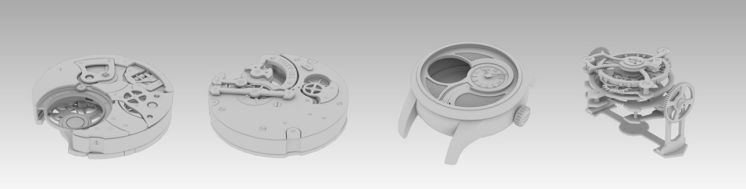
Emerging technologies can provide students and teachers the ability to observe the world from greater perspectives, in turn stimulating one’s creativity (Loveless et al., 2006).
Autodesk Maya is a 3D effects and animation modelling software that allows for realistic virtual views through dynamic features such as motion graphics and 3D animation (Press, 2009 & AutoDesk, 2020). The primary purpose of Autodesk is to enhance the productivity of the design process, users can do this through their ability to visualise – an important component to stimulating ones creativity (Pilkaite & Puodziuniene, 2010). 3D modelling allows one to stimulate design ideas perceptively, whilst still allowing room for experimentation, trial and error (Wei et al., 2015).
Due to Autodesk’s most significant features of a “fully customisable interface”, and an individualised “scripting language (MELscript)” (which can be used for the customisation of facial expressions), the software has become increasingly popular in the film industry (Cosmas et al., 2016, p. 6). With specific regard to the “blend shape technique”, this allows for the immense creative power when animating particular facial features, giving one more control of their desired creative directions (Cosmas et al., 2016, p. 6). With this being said, design tasks allows students to gather information and generate purposeful ideas through collaboration and peer-peer learning (Beghetto & Kaufman, 2010). For example, a year 12 film class are to brainstorm ideas in groups, and later create an animated character on Autodesk.
However, despite the advanced features of the program, the complexity of the software may in turn, slow down the design process (Pilkaite & Puodziuniene, 2010). Thus, the teacher must have a foundation of understanding and technological literacy to ensure the creative process of both the teacher and student is not hindered (Steed, 2019).
Autodesk Maya is also incorporated and used into many aspects of engineering such as civil and mechanical (Pilkaite & Puodziuniene, 2010). Relative to a school setting, a woodwork student is able to begin their design process by creating a 3D model of their desired end of year product. This gives the student the ability to experiment, make fixable mistakes and begin their ideation process (IDEO, 2012).
However, the ultimate features of Autodesk (software enabling both 2D and 3D CAD) does come at a price; a yearly total of $2670 (Autodesk, 2020). This however, is the highest price a user will pay, offering cheaper options; although of course enabling less features.
References
Autodesk. (2019, December 10). Introducing Maya. [Video]. YouTube. https://www.youtube.com/watch?v=TCkOS4F51MI
AutoDesk. (2020). Maya. 3D computer animation, modelling, simulation and rendering software. https://www.autodesk.com.au/products/maya/overview
Beghetto, R. A., & Kaufman, J. C. (Eds.). (2010). Nurturing creativity in the classroom. Cambridge University Press.
Cosmas, J. P., Tsekleves, E., & Constantinides, R. (2016). Creative tools for producing realistic 3D facial expressions and animation.
IDEO (2012). Design Thinking for Educators (2nd Edition). http://designthinkingforeducators.com/
Loveless, A., Burton, J., & Turvey, K. (2006). Developing conceptual frameworks for creativity, ICT and teacher education. Thinking Skills and Creativity, 1(1), 3-13.
Pilkaite, T., & Puodziuniene, N. (2010). Designed objects visualization with Autodesk CAD systems. In Poland: International Conference on Engineering Education. July. 18-22.
Press, A. M. (2009). Autodesk Maya 2010: The Modeling and Animation Handbook. SYBEX Inc..
Steed, M. B. (2019). Dynamic Decision-Making Model: Integrating 3D Printing in Education. In Interdisciplinary and International Perspectives on 3D Printing in Education. IGI Global. 1-27.
Wei, X., Weng, D., Liu, Y., & Wang, Y. (2015). Teaching based on augmented reality for a technical creative design course. Computers & Education, 81, 221-234.
 Welcome to Lilys Blog
Hi Lily,
This was a really insightful post about software that I have very little personal experience with, so I learnt a lot. I found your views on the capacity for the software to assist students in visualising their ideas and stimulate creative thinking very pertinent. The potential for the software to encourage collaboration, peer-peer learning and group work has obvious benefits for student learning, while your warning of the complex nature of the software will lead to educators making sure they are prepared to effectively instruct students in it’s use.
I enjoyed reading about this and will hopefully be able to incorporate some of the views you provide into my own practice!
LikeLike
Hi Lily, your post helped me to understand the advantages and possibilities of using 3D modelling softwares! Since it is digital, as opposed to using physical materials or tools, there are endless possibilities, gives room for students to experiment, and even work collaboratively.
It’s great how you gave examples of contexts in which Autodesk Maya could be useful for students’ learning and creativity. They allowed me to understand how this technology could work in the classroom practically.
I’m just wondering how teachers would be able to demonstrate and model the use of this amazing tool though. It looks like a very complex software!
LikeLike